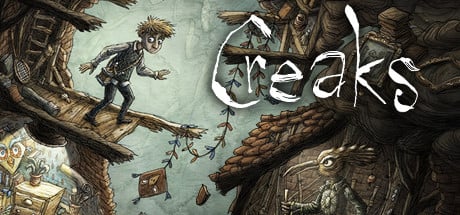
The ground starts shaking, light bulbs are breaking – and something rather unusual is happening right behind the walls of your very room. Equipped with nothing but wit and courage, you slowly descend into a world inhabited by avian folk and seemingly deadly furniture monsters.
Supported Operation Systems
Features
Screenshots
Whats new?
OS: macOS Sierra
Processor: 2 GHz Intel i5 or better
Memory: 4 GB RAM
Graphics: Metal compatible GPU
Storage: 5 GB available space
Features
Screenshots
Whats new?
From the creators of indie classics, Machinarium and Samorost come Creaks, a new puzzle adventure game that delights the senses with its hand-painted visuals, precise animation, eerie sounds, and an eclectic original score from Hidden Orchestra.
Proceed at your own pace at figuring out the solutions to dozens of carefully designed puzzles, explore the mansion for hidden paintings, and uncover the great secret.
Creaks is best enjoyed with a controller and a good pair of headphones.
Whats new?
Release notes were unavailable when this listing was updated.
Typeface is a beautiful font manager that helps you pick the perfect font for your designs. Good typography is one of the most important aspects of design. But it is often hard to find the font that conveys just the right emotion, especially if you’re not sure yet what you’re looking for. With a minimal interface and total focus on your fonts Typeface tries to make browsing your collection exciting and easy, such that you’ll always find just the font you need.
Supported Operation Systems
Features
Screenshots
Whats new?
macOS 10.11 or later, 64-bit processor
Features
Screenshots
Whats new?
Get inspired
Browse swiftly through your library without any distraction. Typeface lets you explore all your installed and imported fonts with live customization of preview text and size.
Reveal every detail
View the Unicode characters that fonts support or inspect the metadata on the info tab. You can even compare to characters of another font to see the small — and big — differences.
Typography by night
The Night theme will let you preview fonts in the dark, which is as eye-soothing as watching fluffy kittens cuddle. If you’re feeling adventurous you may rock this theme during the day as well.
Tag, you’re it
The Typeface offers a very flexible and easy to use tagging system that lets you keep even the largest font libraries under control. Nest tags, combine tags, invert tags or filter tags; spend less time searching, more designing.
Smart sidebar
Designed to get out of your way: swipe to collapse the sidebar and focus on font previews. While dragging it will automatically expand and highlight already attached tags.
Synced directories
Imported locations are kept up-to-date automatically. Just point Typeface to a directory on your Mac and newly downloaded fonts are added on refresh.
Auto activation
Hands-free activation of fonts and you won’t even notice it. Of course, you can also manually activate and deactivate any font when you need to use them.
FOCUS ON YOUR FONTS:
Perfectly rendered previews
Live customization of preview text & size
Intuitive & minimal UI design that doesn’t distract
Light & Dark theme for day and night
IN-DEPTH ORGANIZATION:
Easy to use & flexible tagging system (combine, subtract, invert & nest)
Powerful search & filters (weight, width, slant, and style)
Smart sidebar (auto collapse, tag highlight, drag & drop)
In-place font activation & deactivation
IMPROVE YOUR WORKFLOW:
Collect font candidates using the Quick Collection
Review your choices and refine your selection
Share the results with colleagues and clients on PDF
Store the selection by attaching tags
REVEAL EVERY DETAIL:
Compare fonts using A/B font overlays
Inspect supported Unicode characters
Get detailed font info
Show font family members
AND MUCH MORE:
[NEW] 2000+ free fonts from the Google Fonts catalog
Support for ttf, otf, dfont, TTC and PostScript Type 1 font suitcase
Auto synchronization of imported directories
Import Font Book collections
Collapsed family view
Auto-hide fonts that are missing characters
Auto font style classification
Print to paper and export to PDF
Auto size previews
Letter s p a c I n g
Outlined previews
Metrics overlay
Standard & discretionary ligatures
Export & Import tags to JSON
Many keyboard shortcuts
Import Typekit fonts
Auto activation (beta)
Tagged and Untagged meta-tags
Whats new?
Type to scroll to fonts starting with a specific prefix. For example type ‘he’ to jump to Helvetica
Added grid toolbar button for convenient access to some grid options
Press & hold toolbar buttons to get a menu of options
Press & hold the activation icon to get activation options for a font
Press & hold the Quick Collect icon of collected fonts to quickly access tagging, activation, and clearing options
Show context menus when clicking on sidebar header icons
Add a tag to the search filters from the sidebar context menu
Added Refresh All option to refresh all imported locations when clicking on imported locations icon in the sidebar
Customize drop action when dragging fonts to the toolbar. Right-click on the toolbar to choose a different option. Multi Attach is the default option.
The Long Dark is a thoughtful, exploration-survival experience that challenges solo players to think for themselves as they explore an expansive frozen wilderness in the aftermath of a geomagnetic disaster. There are no zombies — only you, the cold, and all the threats Mother Nature can muster.
Supported Operation Systems
Features
Screenshots
Whats new?
Requires a 64-bit processor and operating system
OS: OSX 10.9.3
Processor: Core i5 @ 2.2GHz
Memory: 4 GB RAM
Graphics: Intel HD Graphics 5000
Storage: 7 GB available space
Sound Card: On-board.
Systems
Features
Screenshots
Whats new?
NO HAND HOLDING: The game challenges players to think for themselves by providing the information but never the answers. You have to earn the right to survive.
PERMADEATH: When you die in Survival Mode, your save is deleted. Every decision matters. [Note that WINTERMUTE does not feature permadeath.
CONDITION & CALORIES: Monitor your Hunger, Thirst, Fatigue, and Cold as you struggle to balance resources with the energy needed to obtain them. Every action costs Calories, and time is your most precious resource. Choose your path carefully.
SCOUR THE WORLD FOR SUPPLIES: Over 100 gear items including Tools, Light Sources, Weapons, First Aid supplies, Clothing, and more.
A VAST LIVING WORLD: Explore a 50 square kilometer Northern Canadian wilderness in search of precious supplies. In Winter. Dynamic time of day, weather, wildlife presence, etc. provide just enough randomness to keep things challenging.
SURVIVAL OF THE FITTEST: Hunt, fish, trap, climb, map, search for life-saving food and gear items, and try to avoid dying from the hostile wildlife, succumbing to hypothermia, frostbite, or dysentery (amongst other uncomfortable afflictions), find and maintain your life-saving gear. Hunt and be hunted by Wolves, Bears, Moose, Rabbits, Deers, Crows, and more to come in future updates.
CHOOSE YOUR EXPERIENCE: Four distinct Experience Modes let you find a challenge level you are comfortable with, such as Pilgrim Mode, which is meant to be quiet and pensive, all the way to Interloper Mode, where only the most experienced survivors have a chance to last a week. If none of the four Experiences suits you, use Custom Mode settings to tailor your Survival Mode game to your specific tastes.
Whats new?
Release notes were unavailable when this listing was updated.
Tomb Raider explores the intense and gritty origin story of Lara Croft and her ascent from a young woman to a hardened survivor. Armed only with raw instincts and the ability to push beyond the limits of human endurance, Lara must fight to unravel the dark history of a forgotten island to escape its relentless hold. Download the Turning Point trailer to see the beginning of Lara’s epic adventure.
Supported Operation Systems
Features
Screenshots
Whats new?
OS:macOS 10.14
Processor:1.1 GHZ Intel Core M or greater
Memory:4GB
Graphics:512Mb Nvidia 640M, 2GB AMD M290, 1.5GB Intel HD 4000 or greater
Hard Drive:14GB
Features
Screenshots
Whats new?
A Turning Point: Experience Lara Croft’s intense origin story from a young woman to a hardened survivor.
An All-New Raiding Experience: Explore a mysterious island filled with environmental puzzles, visceral combat, and tombs to discover.
Fight to Live: Salvage resources, gain experience and upgrade Lara’s weapons and tools to survive the island’s hostile inhabitants.
Survive as a Team: Play a variety of multiplayer modes as Lara’s Shipmates or Yamatai’s Scavengers.
Whats new?
Removes functionality for connecting the game to a Game Center account
Adds functionality for connecting the game to a Calico account
Luxion KeyShot Pro is designed to make 3D rendering and animation easy. It allows you to apply materials and lighting fast and provides the most accurate materials appearances and real-world lighting, all in a powerful interface that provides advanced capabilities and the ability to see all your changes in real-time.
Supported Operation Systems
Features
Screenshots
Whats new?
macOS 10.8 or later
Intel Core 2 Duo or higher
Intel® Core 2 or AMD Athlon® 64 processor
64-bit platform
2GB RAM
2GB Disk Space
Dual-core CPU*
OpenGL 2.0 capable system**
1024 x 768 resolution or higher
Features
Screenshots
Whats new?
Beautiful Style. In real-time: Say goodbye to post-processing. Image styles are the new real-time image adjustment and the beginning of faster image creation. Add tone-mapping. Adjust shadows, highlights, and color. Add background colors or overlays. And create an unlimited set of style variations.
Control your highlights: But not your excitement. KeyShot 9 image styles bring you the capabilities to fine-tune that bloom. And the control over curves can be done live using histogram controls or adjusting shadows, mid-tones and highlights separately.
Cut it like this. Cut it like that: Import your entire 3D model. No need to cut it up before bringing it into KeyShot. A cutaway is applied like material to any geometry you like. So, scale, size, and adjust that cut as much as you need.
Complex coatings: For when you need precise control over the appearance of optical lenses, windows, mirrors, and more, the new multi-layer optics in KeyShot Pro makes it possible. Add layers or custom specifications. Control thickness, color, refraction, and dispersion. The design of optical products has never been easier.
Amazing Materials: As easy as it is to fill your scene with fog, it’s just as easy to use scattering to create incredible materials. Go one step further and apply a density texture to create a unique, one-of-a-kind material, like splintered wood, the fibers of a boat hull, or your favorite sponge material.
Make it juicy: If you’ve ever needed more bubbles in your shots, KeyShot 9 makes it possible with an additional geometry feature in the KeyShot Pro Material Graph. Add as few or as many bubbles as you need. Shake it up. Make it fizz.
Whats new?
Release notes were unavailable when this listing was updated.