The world’s most famous flock has returned in a new version of the mobile game that took the world by storm. Join Red, Chuck, Bomb, Silver, and the rest of the gang for classic slingshot action that will please fans of all ages. Angry Birds Reloaded features familiar physics-based gameplay from the original game – now remastered with visual enhancements, new characters, and plenty of destruction!
Features
NEW BIRDS. NEW PIGS. NEW CHALLENGES: Red, Chuck, Bomb, and the rest of the main flock are here – plus new additions from the expanded Angry Birds movie universe
NEW GAME MODE: Here come the Eagles! wreaking havoc on the island in a series of new levels. Can the Angry Birds stop them?
POWER UP:
Boost your birds’ destructive strength with power-ups. Aim farther, fly higher and knock down the pig’s towers!
TRACK YOUR SCORES with local leaderboards against friends and family members for top bragging rights. All scores are tracked on the same iCloud account.
A TIMELESS CLASSIC – NOW RELOADED: Enjoy the familiar and satisfying slingshot action of the original Angry Birds game, with hundreds of levels of swine-smashing, eagle-whacking, destructive fun in gameplay.
Oddmar struggles with life in his village and is not worthy of a place in Valhalla. He is shunned by his fellow Vikings and must redeem himself of his squandered potential. One day he is offered an opportunity to prove himself, but at a price…
Features
IMMERSE yourself in an epic Viking story animated as a motion comic.
JOURNEY through 24 beautifully hand-crafted levels of physics-based puzzles and platforming challenges.
DISCOVER your true power with magically imbued weapons and shields.
ENCOUNTER new friends and foes on your journey through magical forests, snowy mountains, and treacherous mines.
Produced by the development team behind the award-winning and critically acclaimed Leo’s Fortune.
Oddmar supports iCloud game saves and game controllers.
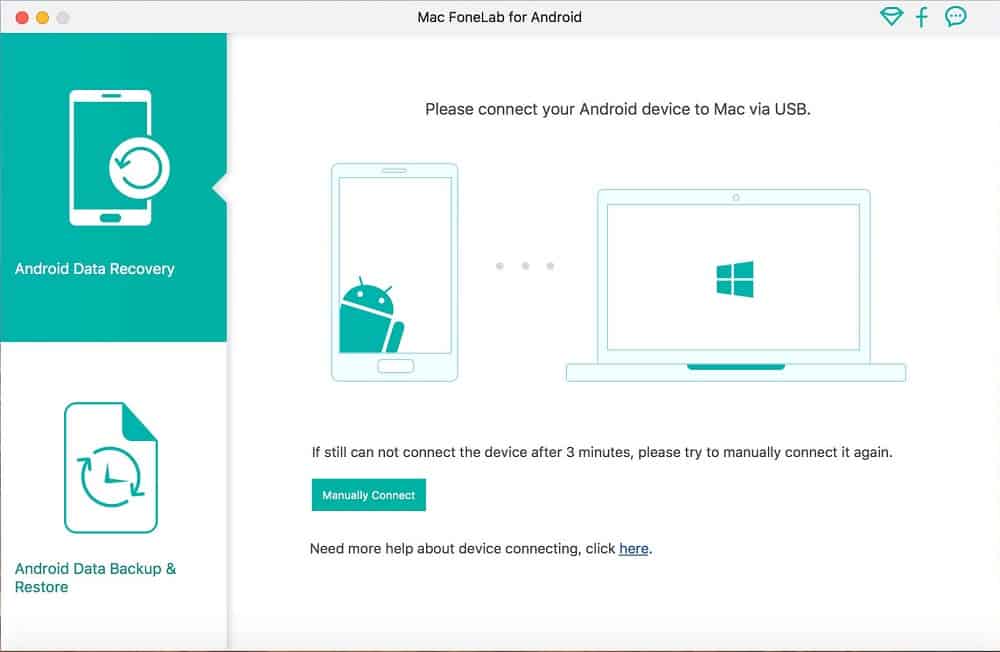
FoneLab for Android is one of the best Android Data Recovery software. Android Data Recovery is great data recovery software for android users that helps you to recover deleted Text Messages, lost Messaging Attachments, lost Contacts, cleared Call History, and Photos, Pictures, Videos, Music, and Documents on your Android phone, tablet, and SD card.
Features
No matter whether you lost your files due to wrong deletion, rooting, upgrading, memory card formatting, virus attacking, or because you crashed, smashed, broke, or dropped your device into water, this Android recovery software can rescue the important data in your device. For existing messages, contacts, photos, and other files, you can also use Android Data Recovery to make backups.
Main Features:
Recover deleted text messages, contacts, and call history from Android phones/tablets and SD cards
Recover deleted photos, videos, music, and document files on Android phones/tablets and SD Cards (Pro version only)
Rescue your Android data from wrong deletion, water damage, etc.
Support Samsung/LG/HTC/Sony/Huawei/ZTE phones/tablets
The simplest, fastest, and safest Free Android data recovery software ever
Recover Lost Contacts, Messages, Message Attachments, and Call Logs
One of the key information for Android users is contact. Losing contacts sometimes means losing connection with important friends. FoneLab Android Data Recovery could help you recover text contents and attachments.
Get Back Photo, Music and Video in Android Phone/SD Card
It brings a lot of headaches when you find your photos/music/video lost due to some mistakes or accidents. With FoneLab Android Data Recovery, you can get back the lost media files which could be precious for you.
Recover Various Documents
Mobile phone sometimes is an alternative to USB Flash disk to store data. FoneLab is capable of recovering the lost documents on your Android phone no matter Text files or Word content.
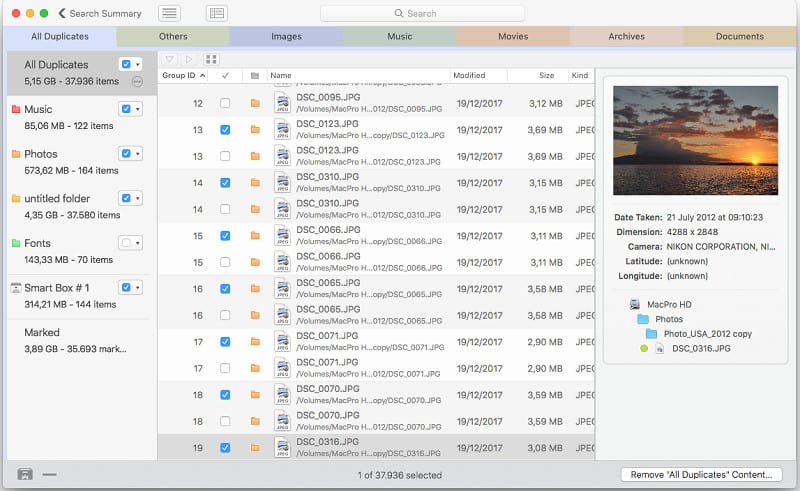
Tidy Up is a full-featured duplicate finder and disk tidiness utility. With Tidy Up you can search for duplicate files and packages by the owner application, content, type, creator, extension, time modified, time created, name, label, visibility, and date/age. You can also search by the tag, duration, and bit installments of MP3 and AAC sound files and EXIF metadata; search the contents of the Photos, iPhoto, Aperture, iTunes, iPod databases, and Mail mailboxes; and synchronize deletions with iPhoto, Mail, and iTunes.
… and etc.
Features
Supports Lightroom: it is now possible to search and collect duplicates directly in the Lightroom library.
Multiple libraries support: the capability to search in the supported apps (Lightroom, Photos, iTunes, Mail, Aperture, and iPhoto) by comparing multiple libraries of the same app with multiple libraries of different apps of the same kind (for example 2 Photos libraries and 3 Lightroom libraries)
Added support to hard links: search for hard links or exclude them from the search and replace the found items with hard links.
Search for unique items gains strength: it’s now possible to use multiple criteria to search for unique items (items that have no duplicates).
Possibility to handle the found items at the administrator level: just allow the installation of the privileged tool and do the cleaning job. This is particularly useful to clean up old Time Machine backups.
New, completely redesigned interface, easy to use, and powerful
Tidy Up 5 organizes the result separating the found items by file kinds, (music, images, PDFs, folders, etc.). It’s completely customizable and allows you to add more file kinds of your choice. The new organization is based on tab separation and each tab has its settings, such as smart boxes, separation by searched sources, view by grid or list, etc.
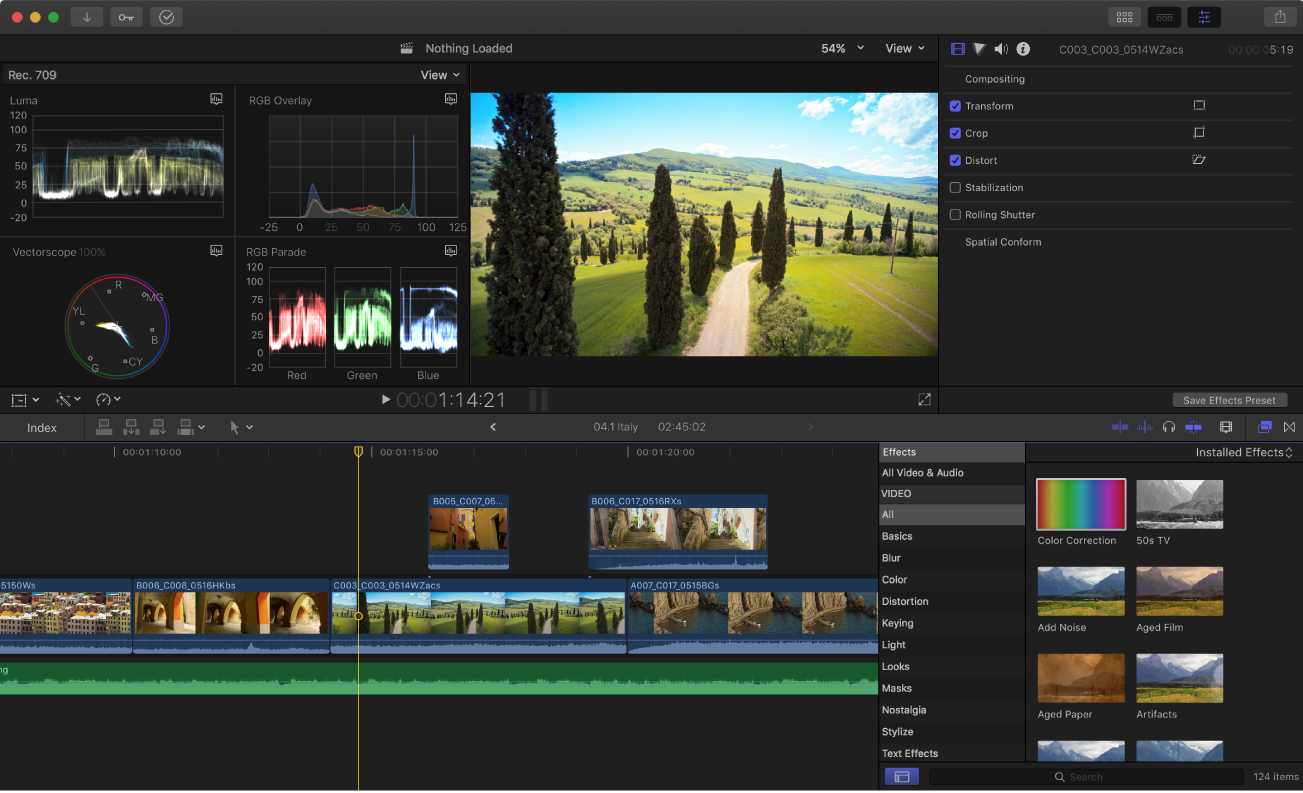
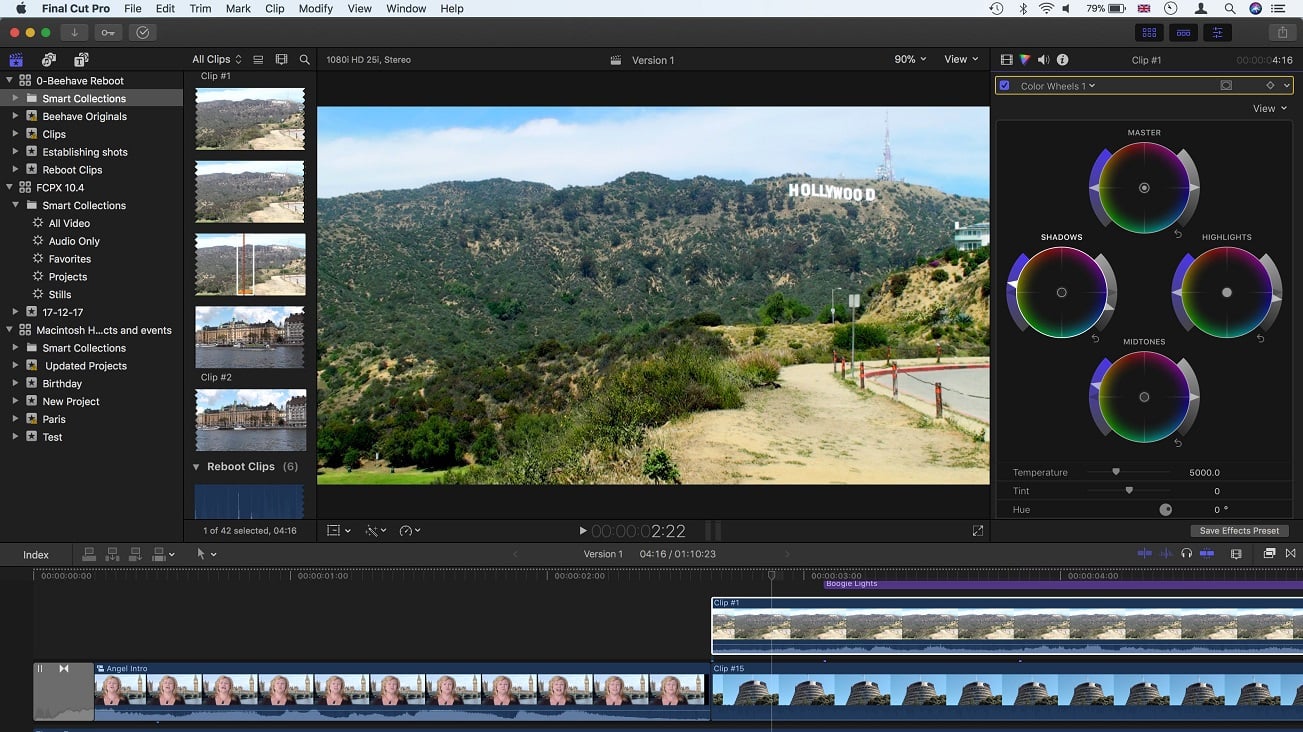
Final Cut Pro debuts a powerful collection of new features for professional editors. A strikingly low-profile interface maximizes the workspace on any display. The new Magnetic Timeline 2 advances beyond traditional, track-based editing with automatic color coding and flexible layouts based on roles. The latest Final Cut Pro release also takes full advantage of the new MacBook Pro with support for the Touch Bar and wide color workflows.
Features
Revolutionary Video Editing
The Magnetic Timeline uses advanced metadata for faster, easier editing
Enhanced Timeline Index lets you drag and drop audio roles to rearrange the layout of your timeline
Use Clip Connections to attach B-roll, sound effects, and music to the timeline
Reduce clutter by grouping clips into a Compound Clip
Edit multicamera projects with automatic syncing and support for up to 64 camera angles
Automatically transform projects for square or vertical delivery with Smart Conform
Import and edit 360° equirectangular video in a wide range of formats and frame sizes
Create, edit, and deliver closed captions from within Final Cut Pro
Extend the capabilities of Final Cut Pro with third-party workflow extensions
Powerful Media Organization
Organize your work within libraries for efficient media management and collaboration
Create proxy copies of your media for portability and performance
Content Auto-Analysis captures camera metadata and analyzes shots in the background
Create and apply custom keywords or favorites on the fly as you select clip ranges
Smart Collections dynamically organize content for you to quickly find any shot in a few clicks
Incredible Performance
Improved performance and efficiency on Mac computers with Apple silicon
Harness the power of the Mac Pro and Afterburner for real-time 8K editing
Modern Metal engine improves playback, rendering, and compositing on all Macs
Final Cut Pro uses all the GPUs in your Mac for superior real-time playback performance and fast background rendering
Work with a broad range of formats including ProRes, RED, XAVC, AVCHD, Avid DNxHR®, Avid DNxHD®, H.264, HEVC, and more
Compelling, Customizable Effects
Beautifully animated, easily customizable 2D and 3D titles
Change the look of titles, transitions, and effects using intuitive controls
Choose from an ecosystem of third-party FxPlug plug-ins with custom interfaces
Integrated Audio Editing
Assign roles — including dialogue, music, effects, and custom choices — during import to easily track and organize your project
Expand and edit multichannel audio files directly in the timeline
Sync video with separate audio in a single step with instant audio waveform matching
Intuitive Color Grading
Import, edit and deliver video in standard color spaces, or in wide Rec. 2020 color space
Use Pro Display XDR to accurately view HDR video
Powerful color wheels and curves for precise adjustments with keying and masks
One-Step, Optimized Output
Incredibly fast export for playback on Apple devices and upload to websites such as Vimeo and YouTube
Export audio stems and multiple versions of a finished video using roles metadata
Import and export XML for third-party workflows like color grading and sound mixing
System Requirements: macOS 10.15.6 or later, 4GB of RAM (8GB recommended for 4K editing, 3D titles, and 360° video editing), Metal-capable graphics card, 1GB of VRAM recommended for 4K editing, 3D titles, and 360° video editing, 3.8GB of available disk space.
Some features require Internet access; fees may apply. A Blu-ray recorder is required for burning Blu-ray discs.
Whats new?
Supports faster exporting of H.264 or HEVC on Macs with Apple silicon
Increases stability when disconnecting a Sidecar display on Intel Macs
Improves performance when editing on a Mac with an ambient light sensor